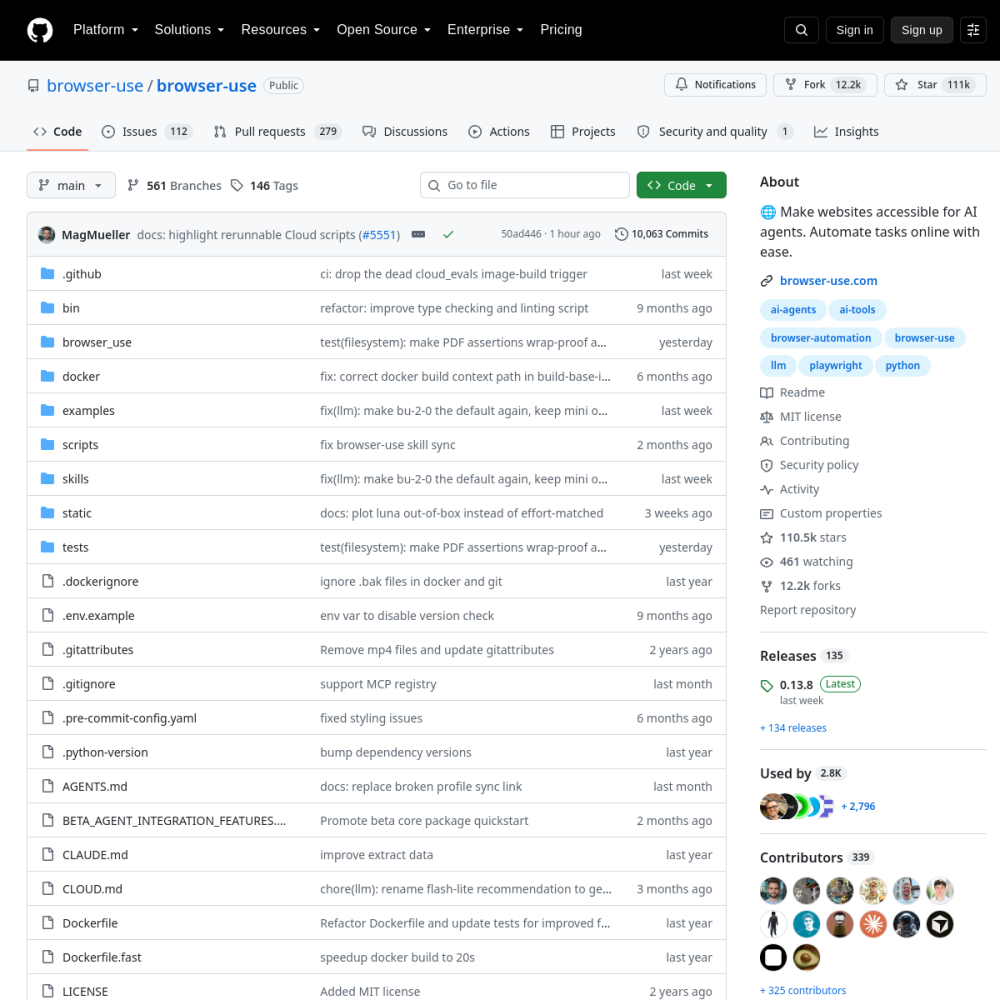
browser-use

Vendor: browser-use

Browser Use is a Python-native open-source framework that lets LLM agents operate web browsers autonomously via DOM extraction, accessibility tree mapping, and structured action primitives, enabling reliable form filling, navigation, and multi-step web automation.

View Repository

Official Preview
browser-use

Technical Specifications

Repositorybrowser-use/browser-use
GitHub Stars★ 110.9k
Forks12.2k forks
Primary LanguagePython
LicenseMIT
Technical DomainAGENTS
ai-agentsai-toolsbrowser-automationbrowser-usellmplaywrightpython
4.8Overall
Functionality
5.0
Documentation
4.7
Activity
4.9
Ease of use
0.0

Quickstart & Installation

$ pip install browser-use

Comprehensive Review

Browser Use represents a paradigm shift in how LLM-driven agents interact with the web. Rather than relying on brittle CSS selectors or raw screenshots alone, the framework implements a hybrid approach: it extracts a simplified DOM and accessibility tree, maps interactive elements to indexed, LLM-friendly handles, and exposes a constrained action space (click, type, scroll, navigate, switch tab, extract data). This dramatically reduces the prompt-token overhead and hallucination risk that plague pure vision-based agents. The architecture is model-agnostic via LangChain integration, supporting OpenAI, Anthropic, Google, and open-weight models through a unified LLM interface. A core breakthrough is its element-indexing system: the agent reasons over a text representation of the page where each actionable element is tagged with a unique index (e.g., [1], [2]), and the controller resolves these indices back to live Playwright elements at execution time. This decouples the LLM's symbolic reasoning from the underlying DOM volatility. The framework also implements a robust agentic loop with step-by-step state extraction, error recovery, and optional vision grounding for complex layouts. By wrapping Playwright, it inherits battle-tested browser automation primitives while exposing them through a semantic layer optimized for LLM consumption. The inclusion of self-correction mechanisms—where the agent evaluates page state changes after each action and can retry failed interactions—addresses the reliability gap that has historically prevented autonomous web agents from operating in production. For enterprise deployment, the framework supports parallel agent execution, persistent browser profiles, and a cloud-hosted API for managed infrastructure. The open-source core remains MIT-licensed, allowing deep customization of prompt templates, action definitions, and extraction logic. While challenges remain in token budget management for long-running tasks and sandboxing untrusted agent workflows, Browser Use establishes a new baseline for what production-grade web automation agents can achieve.

Project Background

Browser Use emerged from a fundamental tension in AI agent development: LLMs possess the reasoning capability to navigate complex web workflows, but the interface layer between the model and the browser has historically been a failure point. Traditional automation frameworks like Selenium or Playwright rely on brittle CSS selectors that break upon minor UI changes, while pure vision-based approaches suffer from high token costs, low reliability, and an inability to interact with dynamically loaded elements. The design philosophy of Browser Use addresses this by introducing a semantic abstraction layer that translates the live DOM into a structured, LLM-readable text representation. This representation strips away non-interactive noise and tags each actionable element with a unique index, allowing the LLM to reason over a simplified page model and issue commands like 'click [5]' or 'type [12] hello world' without ever needing to understand the underlying HTML structure.

The core architectural breakthrough of Browser Use lies in its decoupling of symbolic reasoning from execution. The agent operates on a text-based snapshot of the page, making decisions based on a clean, indexed representation of interactive elements. The controller then resolves these indices back to live Playwright elements at runtime, handling the complexities of JavaScript rendering, shadow DOM penetration, and dynamic content loading. This separation ensures that minor DOM volatility does not invalidate the agent's reasoning chain. Furthermore, the framework implements a self-correcting agentic loop where the agent evaluates the resulting page state after each action. If an expected outcome does not occur—such as a modal failing to close or a navigation stalling—the agent can diagnose the issue, adjust its approach, and retry. This closed-loop feedback mechanism is critical for production reliability, transforming web automation from a linear script into an adaptive, goal-oriented process. By wrapping Playwright, the framework inherits a battle-tested execution engine while exposing it through a layer optimized for LLM consumption, effectively bridging the gap between high-level reasoning and low-level browser control.

Core Use Cases

A primary enterprise use case for Browser Use is autonomous form filling and multi-step web application testing. In complex enterprise environments, internal tools and customer portals frequently lack comprehensive API coverage, requiring manual data entry and UI-driven workflows. Browser Use allows agents to navigate these dynamic single-page applications, locate input fields via semantic understanding rather than selectors, and complete forms accurately. For QA teams, this enables autonomous end-to-end testing where the agent adapts to UI changes without requiring test script maintenance. The agent can verify state changes, validate error messages, and ensure multi-step workflows function correctly across different user roles and data scenarios, dramatically reducing the maintenance overhead associated with traditional automated testing frameworks.

Another significant use case is structured data extraction from unstructured web sources. Enterprises often need to aggregate data from competitor sites, market research portals, or legacy internal systems that do not expose APIs. Browser Use agents can navigate complex site hierarchies, handle pagination, bypass anti-bot mechanisms through human-like interaction patterns, and extract specific data points based on natural language queries. The agent's ability to reason about page content allows it to identify and extract relevant information even when page structures vary significantly. This is particularly valuable for competitive intelligence, lead generation, and financial data aggregation where the target data is embedded in complex, dynamic layouts.

Enterprise workflow automation represents a third major use case. Many business processes span multiple applications and require human intervention to transfer data between systems. Browser Use agents can orchestrate cross-platform workflows, such as reading customer data from a CRM, validating it against an external database, and entering the results into an ERP system. The framework's support for persistent browser profiles allows agents to maintain authenticated sessions across long-running tasks, while its parallel execution capabilities enable multiple agents to work concurrently on different workflow steps. This transforms manual, repetitive data entry tasks into autonomous, reliable processes that can operate around the clock with minimal human oversight.

Finally, Browser Use excels in adaptive QA automation pipelines. Traditional test automation frameworks require constant maintenance as UI elements change, selectors break, and page structures evolve. An agent-based approach allows tests to be specified in natural language intent rather than implementation details. The agent reasons about the page, locates elements by their semantic meaning, and adapts its interaction strategy when the UI changes. This reduces test maintenance to near zero and enables QA teams to focus on defining test intent rather than maintaining brittle scripts. The framework's self-correction mechanisms ensure that transient failures do not cause false negatives, providing more reliable test outcomes than traditional selector-based approaches.

Quickstart Guide

Getting started with Browser Use is straightforward due to its Python-native design and PyPI distribution. The framework requires Python 3.11 or higher and Playwright for browser automation. Installation begins with pip install browser-use, followed by playwright install chromium to set up the browser binary. The core abstraction is the Agent class, which takes a task description and an LLM instance as input. The framework integrates with LangChain's model interface, allowing developers to swap between OpenAI, Anthropic, Google, and open-weight models by changing a single configuration line. Environment variables such as OPENAI_API_KEY or ANTHROPIC_API_KEY are used for authentication, and the framework supports both local and remote browser instances for flexible deployment scenarios.

A minimal implementation involves importing the Agent class, initializing an LLM, and invoking the agent with a natural language task. For example: from browser_use import Agent; from langchain_openai import ChatOpenAI; import asyncio; llm = ChatOpenAI(model='gpt-4o'); agent = Agent(task='Go to google.com and search for the latest AI news', llm=llm); asyncio.run(agent.run()). This snippet creates an agent that autonomously navigates to Google, locates the search input, enters the query, and extracts the results. The framework's default configuration handles DOM extraction, element indexing, and action execution automatically. Developers can customize the agent's behavior by extending the Controller class to register custom actions, modifying prompt templates to include domain-specific instructions, or configuring browser options such as headless mode, viewport size, and proxy settings.

For advanced configurations, Browser Use supports MCP (Model Context Protocol) server integration, allowing agents to access external tools and data sources during task execution. The framework also provides a CLI tool for running agents from the command line, enabling integration into CI/CD pipelines and scheduled task systems. Configuration can be provided via Python code, YAML files, or environment variables. For production deployments, the framework supports persistent browser profiles for maintaining authenticated sessions, parallel agent execution for scaling throughput, and detailed logging of agent reasoning traces for debugging and observability. The cloud-hosted API offers a managed alternative for teams that want to skip infrastructure setup, providing the same agent capabilities as a service.

Practicality Assessment

In production environments, Browser Use demonstrates strong reliability for standard web automation tasks, though its performance characteristics vary significantly based on the complexity of the target site and the LLM model chosen. Latency is primarily driven by LLM inference time, with each agentic step requiring a model call to process the current page state and decide the next action. For simple tasks like form filling on a known site, end-to-end execution can take 10-30 seconds, while complex multi-page workflows may require several minutes. Token budget management is a critical concern: large, complex pages generate substantial DOM representations, and long-running tasks can quickly consume context windows. The framework provides options to mitigate this, including viewport restriction to limit visible elements, custom extraction logic to filter irrelevant content, and support for models with large context windows like Claude 3.5 Sonnet or Gemini 1.5 Pro.

Scalability is supported through parallel agent execution, where multiple agents can operate concurrently on independent browser instances. However, this approach scales linearly with infrastructure cost, as each agent requires its own browser process and LLM API calls. For enterprise deployments, the cloud-hosted API provides managed infrastructure that handles browser provisioning, session management, and rate limiting. The framework's main advantage is its adaptability: unlike traditional automation that breaks when UI elements change, Browser Use agents can reason about the page and find alternative paths to accomplish their goals. This dramatically reduces maintenance overhead and enables automation of workflows that were previously too dynamic for traditional scripting. The self-correction mechanisms also improve reliability, as agents can recover from transient errors and unexpected page states without human intervention.

Key caveats for production deployment include debugging overhead and sandboxing security. When an agent fails to complete a task, diagnosing the failure requires reviewing the agent's reasoning trace, the page states it encountered, and the actions it took. This is more complex than debugging traditional automation scripts, as the failure may stem from the LLM misinterpreting page content, an action failing to execute correctly, or a combination of both. The framework provides detailed logging to support this debugging process, but it requires expertise in both LLM behavior and web automation to diagnose effectively. On the security side, running autonomous agents with access to live browsers introduces significant risk if the agent encounters malicious content or is instructed to interact with untrusted sites. Sandboxing through isolated browser profiles, network-level restrictions, and strict action allow-listing is essential for production deployments. Organizations must also consider the data privacy implications of sending page content to LLM APIs, as sensitive information may be present in the extracted DOM representations.

Real-world Deployments

Browser Use has seen rapid adoption in the AI agent ecosystem due to its open-source nature and robust architecture. It is frequently used as the browser interaction layer in larger agentic frameworks, where it provides the web automation capabilities that higher-level orchestration systems lack. Notable integrations include use within LangChain and AutoGen workflows, where Browser Use handles browser interaction while the orchestrating framework manages task decomposition, memory, and multi-agent coordination. The framework's model-agnostic design has made it a popular choice for developers building custom AI assistants, as it can be paired with any LLM provider without vendor lock-in. Its MIT license has also encouraged fork-based customization, with many organizations extending the core framework with domain-specific actions, custom extraction logic, and enterprise authentication mechanisms.

The framework has been adopted across diverse industries for real-world automation tasks. In e-commerce, it powers automated price monitoring, inventory tracking, and competitor analysis tools that navigate complex retail sites and extract structured data. In finance, it is used for automated account reconciliation, invoice processing, and regulatory compliance checks where legacy systems lack modern APIs. In HR and recruitment, Browser Use agents automate candidate sourcing across multiple job boards, parsing resumes and entering data into applicant tracking systems. The framework's ability to handle authenticated sessions and complex form interactions makes it particularly valuable for internal tool automation, where enterprises use it to bridge gaps between disconnected systems. The availability of a cloud-hosted API has further lowered the barrier to adoption, enabling teams without deep browser automation expertise to leverage agent-driven web automation in production.

Ecosystem adoption extends beyond direct usage to include educational and research applications. Browser Use is frequently referenced in AI agent tutorials and courses as a canonical example of web automation agents, due to its clean architecture and approachable codebase. Research teams use the framework as a baseline for experimenting with new agent architectures, prompt strategies, and evaluation methodologies. The project's active community contributes custom actions, prompt templates, and site-specific configurations that extend the framework's capabilities. This vibrant ecosystem has positioned Browser Use as a reference implementation for LLM-driven web automation, and its architectural patterns are being adopted by newer frameworks. The project's momentum, evidenced by its high GitHub star count and active development cycle, suggests it will remain a central component of the AI agent toolchain for the foreseeable future.

Core Strengths

  • Hybrid DOM/accessibility tree extraction with indexed element handles for LLM-friendly symbolic reasoning
  • Model-agnostic architecture via LangChain integration supporting OpenAI, Anthropic, Google, and open-weight models
  • Self-correcting agentic loop with post-action state evaluation and automatic retry logic for failed interactions
  • Playwright-backed execution layer providing robust browser primitives wrapped in a semantic abstraction

Considerations & Limitations

  • In production environments, Browser Use demonstrates strong reliability for standard web automation tasks, though its pe...
  • Scalability is supported through parallel agent execution, where multiple agents can operate concurrently on independent...

Frequently Asked Questions (FAQ)

What is browser-use and what key challenges does it solve?

browser-use is an open-source AI project developed primarily in Python under the MIT license. Browser Use is a Python-native open-source framework that lets LLM agents operate web browsers autonomously via DOM extraction, accessibility tree mapping, and structured action primitives, enabling reliable form filling, navigation, and multi-step web automation.. Browser Use emerged from a fundamental tension in AI agent development: LLMs possess the reasoning capability to navigate complex web workflows, but the interface layer between the model and the browser has historically been a failure point. Traditional automation frameworks like Selenium or Playwright rely on brittle CSS selectors that break upon minor UI changes, while pure vision-based approaches suffer from high token costs, low reliability, and an inability to interact with dynamically loaded elements. The design philosophy of Browser Use addresses this by introducing a semantic abstraction layer that translates the live DOM into a structured, LLM-readable text representation. This representation strips away non-interactive noise and tags each actionable element with a unique index, allowing the LLM to reason over a simplified page model and issue commands like 'click [5]' or 'type [12] hello world' without ever needing to understand the underlying HTML structure. The core architectural breakthrough of Browser Use lies in its decoupling of symbolic reasoning from execution. The agent operates on a text-based snapshot of the page, making decisions based on a clean, indexed representation of interactive elements. The controller then resolves these indices back to live Playwright elements at runtime, handling the complexities of JavaScript rendering, shadow DOM penetration, and dynamic content loading. This separation ensures that minor DOM volatility does not invalidate the agent's reasoning chain. Furthermore, the framework implements a self-correcting agentic loop where the agent evaluates the resulting page state after each action. If an expected outcome does not occur—such as a modal failing to close or a navigation stalling—the agent can diagnose the issue, adjust its approach, and retry. This closed-loop feedback mechanism is critical for production reliability, transforming web automation from a linear script into an adaptive, goal-oriented process. By wrapping Playwright, the framework inherits a battle-tested execution engine while exposing it through a layer optimized for LLM consumption, effectively bridging the gap between high-level reasoning and low-level browser control.

How can I quickly install and run browser-use locally?

Getting started with Browser Use is straightforward due to its Python-native design and PyPI distribution. The framework requires Python 3.11 or higher and Playwright for browser automation. Installation begins with pip install browser-use, followed by playwright install chromium to set up the browser binary. The core abstraction is the Agent class, which takes a task description and an LLM instance as input. The framework integrates with LangChain's model interface, allowing developers to swap between OpenAI, Anthropic, Google, and open-weight models by changing a single configuration line. Environment variables such as OPENAI_API_KEY or ANTHROPIC_API_KEY are used for authentication, and the framework supports both local and remote browser instances for flexible deployment scenarios. A minimal implementation involves importing the Agent class, initializing an LLM, and invoking the agent with a natural language task. For example: from browser_use import Agent; from langchain_openai import ChatOpenAI; import asyncio; llm = ChatOpenAI(model='gpt-4o'); agent = Agent(task='Go to google.com and search for the latest AI news', llm=llm); asyncio.run(agent.run()). This snippet creates an agent that autonomously navigates to Google, locates the search input, enters the query, and extracts the results. The framework's default configuration handles DOM extraction, element indexing, and action execution automatically. Developers can customize the agent's behavior by extending the Controller class to register custom actions, modifying prompt templates to include domain-specific instructions, or configuring browser options such as headless mode, viewport size, and proxy settings. For advanced configurations, Browser Use supports MCP (Model Context Protocol) server integration, allowing agents to access external tools and data sources during task execution. The framework also provides a CLI tool for running agents from the command line, enabling integration into CI/CD pipelines and scheduled task systems. Configuration can be provided via Python code, YAML files, or environment variables. For production deployments, the framework supports persistent browser profiles for maintaining authenticated sessions, parallel agent execution for scaling throughput, and detailed logging of agent reasoning traces for debugging and observability. The cloud-hosted API offers a managed alternative for teams that want to skip infrastructure setup, providing the same agent capabilities as a service.

What are the main use cases and strengths of browser-use?

browser-use is well-suited for Autonomous end-to-end form filling and multi-step web application testing across dynamic SPAs, Structured data extraction from unstructured web sources using natural language queries and agent-driven navigation, Enterprise workflow automation including CRM updates, invoice processing, and cross-platform data synchronization, QA automation pipelines where agents adapt to UI changes without requiring brittle selector maintenance. With an overall rating of 4.8/5, it offers strong community activity, reliable performance, and easy integration with existing AI pipelines.

What limitations or architectural considerations should be kept in mind for browser-use?

In production environments, Browser Use demonstrates strong reliability for standard web automation tasks, though its performance characteristics vary significantly based on the complexity of the target site and the LLM model chosen. Latency is primarily driven by LLM inference time, with each agentic step requiring a model call to process the current page state and decide the next action. For simple tasks like form filling on a known site, end-to-end execution can take 10-30 seconds, while complex multi-page workflows may require several minutes. Token budget management is a critical concern: large, complex pages generate substantial DOM representations, and long-running tasks can quickly consume context windows. The framework provides options to mitigate this, including viewport restriction to limit visible elements, custom extraction logic to filter irrelevant content, and support for models with large context windows like Claude 3.5 Sonnet or Gemini 1.5 Pro. Scalability is supported through parallel agent execution, where multiple agents can operate concurrently on independent browser instances. However, this approach scales linearly with infrastructure cost, as each agent requires its own browser process and LLM API calls. For enterprise deployments, the cloud-hosted API provides managed infrastructure that handles browser provisioning, session management, and rate limiting. The framework's main advantage is its adaptability: unlike traditional automation that breaks when UI elements change, Browser Use agents can reason about the page and find alternative paths to accomplish their goals. This dramatically reduces maintenance overhead and enables automation of workflows that were previously too dynamic for traditional scripting. The self-correction mechanisms also improve reliability, as agents can recover from transient errors and unexpected page states without human intervention. Key caveats for production deployment include debugging overhead and sandboxing security. When an agent fails to complete a task, diagnosing the failure requires reviewing the agent's reasoning trace, the page states it encountered, and the actions it took. This is more complex than debugging traditional automation scripts, as the failure may stem from the LLM misinterpreting page content, an action failing to execute correctly, or a combination of both. The framework provides detailed logging to support this debugging process, but it requires expertise in both LLM behavior and web automation to diagnose effectively. On the security side, running autonomous agents with access to live browsers introduces significant risk if the agent encounters malicious content or is instructed to interact with untrusted sites. Sandboxing through isolated browser profiles, network-level restrictions, and strict action allow-listing is essential for production deployments. Organizations must also consider the data privacy implications of sending page content to LLM APIs, as sensitive information may be present in the extracted DOM representations.