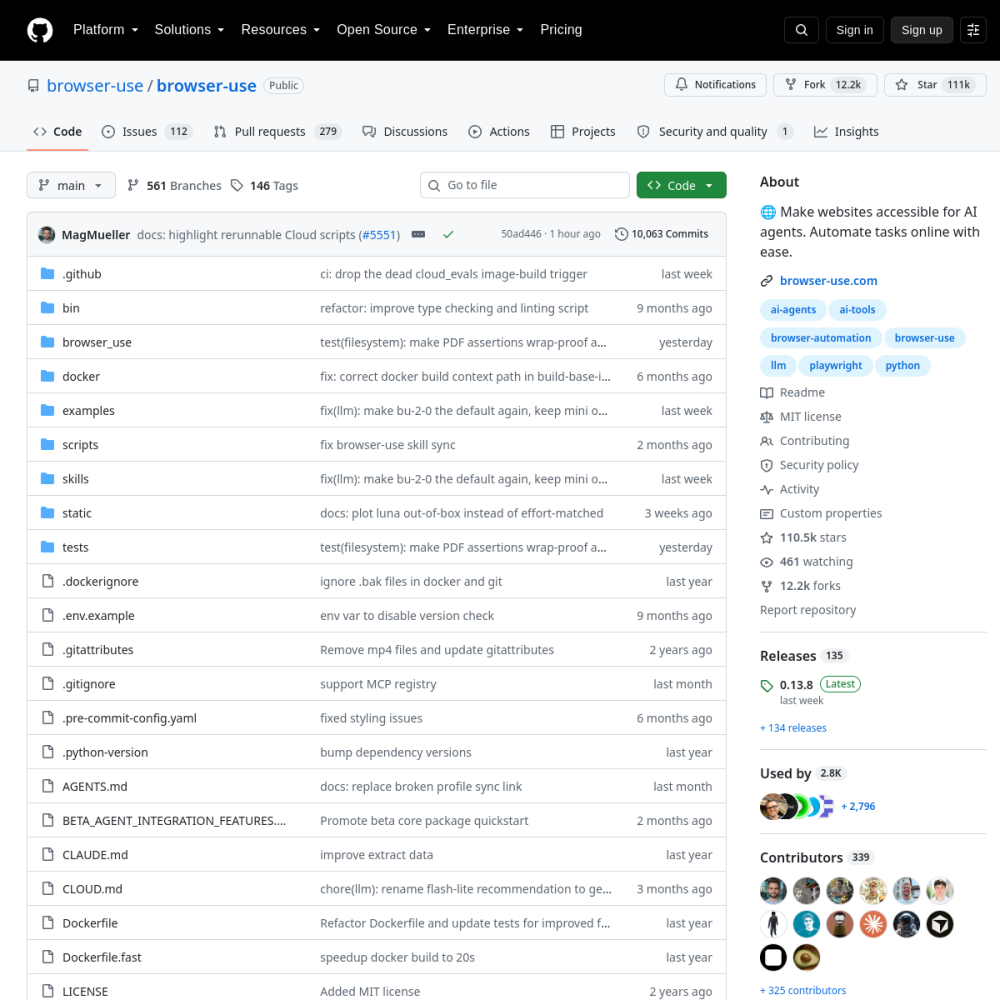
browser-use

Vendor: browser-use

Browser Use is a production-grade open-source framework that bridges large language models with real-world web environments through autonomous browser control, enabling AI agents to navigate, interact with, and extract data from websites with human-like precision.

View Repository

Official Preview
browser-use

Technical Specifications

Repositorybrowser-use/browser-use
GitHub Stars★ 110.9k
Forks12.2k forks
Primary LanguagePython
LicenseMIT
Technical DomainAGENTS
ai-agentsai-toolsbrowser-automationbrowser-usellmplaywrightpython
4.8Overall
Functionality
5.0
Documentation
4.7
Activity
4.9
Ease of use
0.0

Quickstart & Installation

$ git clone https://github.com/browser-use/browser-use.git && cd browser-use

Comprehensive Review

Browser Use represents a paradigm shift in how AI agents interact with the modern web. Built in Python under the MIT license, this framework provides a robust abstraction layer between LLM reasoning capabilities and browser-level DOM manipulation, effectively solving one of the most persistent challenges in agentic AI: reliable, autonomous web interaction. The architecture leverages Playwright under the hood for browser automation while introducing a sophisticated agent loop that combines vision-based page understanding, semantic element extraction, and goal-directed action planning. Unlike traditional RPA tools that require rigid selectors and brittle XPath-based navigation, Browser Use employs a vision-language model pipeline that interprets web pages holistically—capturing screenshots, extracting accessible text, and mapping interactive elements into a structured representation that the LLM can reason about. The framework's core innovation lies in its action space design: rather than exposing raw browser APIs, it defines a constrained set of high-level actions (click, type, scroll, extract, navigate) that the agent selects from based on task context. This abstraction dramatically reduces hallucination rates and improves task completion reliability. The project also introduces a skill-based architecture where complex workflows can be decomposed into reusable, composable agent behaviors. Memory management is handled through a structured trace system that maintains conversation history, page state snapshots, and action logs, enabling multi-step reasoning across extended sessions. The framework supports multiple LLM backends including OpenAI, Anthropic, and local models through a unified interface, making it adaptable to diverse deployment scenarios. Its MCP (Model Context Protocol) integration further extends its utility as a tool provider within larger agent ecosystems, allowing other agents to delegate browser tasks seamlessly.

Project Background

Browser Use emerged from a fundamental observation in the AI agent landscape: while large language models have achieved remarkable reasoning capabilities, their ability to interact with the real-world web remains severely constrained by brittle automation patterns. Traditional approaches relied on hardcoded selectors, XPath expressions, and rigid state machines that shattered under the slightest DOM mutation. The project's design philosophy centers on treating the browser as a first-class reasoning environment rather than a mere execution target. By introducing a perception-action loop inspired by reinforcement learning architectures, Browser Use enables agents to observe web pages through multiple modalities—DOM structure, visual screenshots, and accessibility trees—then reason about optimal next actions in a continuous feedback cycle.

The architectural breakthrough lies in the framework's semantic abstraction layer. Rather than exposing raw browser automation primitives, Browser Use constructs a structured representation of the current page state that includes element bounding boxes, accessibility labels, interaction affordances, and contextual relationships. This representation is then serialized into a compact prompt format that the LLM can process efficiently while retaining sufficient spatial and semantic information for accurate action selection. The framework also implements a sophisticated error recovery mechanism: when an action fails (e.g., an element is no longer visible), the agent can re-perceive the page state and adapt its strategy, mimicking human problem-solving behavior. This resilience is achieved through a combination of retry policies, fallback action strategies, and state diffing algorithms that detect unexpected page transitions.

Memory isolation and session management represent another critical architectural concern addressed by Browser Use. Each agent session maintains a structured trace comprising page snapshots, action histories, and intermediate reasoning outputs. This trace serves dual purposes: it provides the context window for ongoing task execution and creates an audit trail for debugging and compliance. The framework supports both short-term working memory (current task context) and long-term memory (cross-session knowledge) through pluggable memory stores, enabling agents to learn from past interactions and improve over time.

Core Use Cases

Enterprise data extraction represents one of the most impactful use cases for Browser Use. Organizations dealing with dynamic, JavaScript-rendered websites—such as e-commerce platforms, financial portals, and government databases—can deploy Browser Use agents to autonomously navigate complex multi-page workflows, extract structured data, and handle authentication challenges. Unlike traditional scraping tools that require per-site custom code, Browser Use agents can be instructed in natural language to extract specific data patterns, adapting to layout changes without manual intervention. The framework's ability to handle CAPTCHAs, login flows, and pagination through learned interaction patterns makes it particularly valuable for large-scale data operations.

AI-powered quality assurance testing leverages Browser Use's natural language task specification to transform how software teams approach web application testing. Test engineers can describe desired user journeys in plain English—'navigate to the checkout page, add a product to cart, apply a discount code, and verify the total'—and the agent autonomously executes these scenarios across browser configurations. The framework's screenshot capture and action logging provide detailed failure diagnostics, showing exactly where and why a test scenario broke. This approach dramatically reduces test maintenance overhead compared to traditional Selenium-based suites, as tests adapt to UI changes through the agent's perception capabilities rather than requiring selector updates.

Multi-agent system integration via MCP protocol positions Browser Use as a specialized browser tool within larger AI agent architectures. In a multi-agent setup, a coordinator agent can delegate web interaction tasks to a Browser Use agent, receiving structured results without needing browser expertise itself. This separation of concerns enables building complex systems where different agents specialize in different domains—research, communication, browser interaction, code execution—while collaborating through well-defined interfaces. The MCP integration ensures that browser capabilities are discoverable and callable by any MCP-compatible agent framework, making Browser Use a building block rather than a standalone solution.

Automated customer support and account management workflows benefit from Browser Use's ability to navigate authenticated web applications. Support agents (human or AI) can delegate routine tasks like password resets, subscription modifications, or account verification to Browser Use agents that operate within the same browser session as the support tool. The framework's session management and cookie handling ensure that authentication state is preserved across interactions, while its action logging provides complete audit trails for compliance requirements.

Quickstart Guide

Installation is straightforward via pip: 'pip install browser-use'. The framework requires Python 3.10+ and automatically installs Playwright as a dependency. After installation, browser binaries must be downloaded via 'playwright install chromium'. Configuration involves setting API keys for your chosen LLM provider—OpenAI, Anthropic, or compatible endpoints. The framework supports environment variable configuration through a .env file, with keys like OPENAI_API_KEY or ANTHROPIC_API_KEY determining the model backend. For production deployments, the framework supports proxy configuration, custom browser profiles, and headless/headed mode selection through the BrowserConfig class.

A minimal agent invocation demonstrates the framework's simplicity: instantiate an Agent with a task description, configure the LLM backend, and call run(). The agent autonomously perceives the page, plans actions, executes them, and iterates until the task is complete or max steps are reached. For example, creating an agent that searches for information involves specifying the task as a natural language string, setting the browser configuration, and optionally providing extraction schemas for structured output. The framework returns a structured result containing the extracted data, action trace, and final page state.

Advanced configurations include custom action spaces for domain-specific tasks, memory store integration for cross-session persistence, and MCP server setup for multi-agent integration. The MCP server can be configured to expose browser capabilities to other agents through a standardized protocol, enabling tool discovery and invocation without direct code dependencies. Prompt customization allows fine-tuning the agent's behavior through system prompt overrides, action space modifications, and observation formatting changes.

Practicality Assessment

Browser Use demonstrates strong production readiness with its MIT licensing, comprehensive test coverage, and active development cadence. The framework handles real-world challenges including page load timeouts, network errors, dynamic content rendering, and anti-bot detection through configurable retry policies and browser fingerprinting options. Latency characteristics are dominated by LLM inference time rather than browser interaction overhead, with typical action cycles completing in 2-8 seconds depending on model choice and page complexity. The framework supports concurrent agent execution through isolated browser contexts, enabling parallel task processing for batch operations.

Token budget management is a critical consideration in production deployments. Browser Use addresses this through configurable observation compression—agents can be instructed to provide concise page summaries rather than full DOM dumps when token budgets are constrained. The framework also supports streaming observations for real-time feedback and early termination when task completion is detected. For long-running tasks, the checkpoint mechanism allows agents to save state and resume from interruptions, preventing expensive re-execution of completed steps.

Security considerations include sandboxing through isolated browser contexts, network proxy support for traffic inspection, and action logging for audit compliance. The framework does not execute arbitrary JavaScript from the agent's perspective, limiting injection attack surfaces. However, operators should be aware that agents operating in authenticated sessions have access to whatever credentials are loaded in the browser profile, making credential management and session isolation critical for multi-tenant deployments. Debugging overhead is mitigated through comprehensive trace logging, screenshot capture at each step, and a replay mechanism that allows operators to review agent behavior post-hoc.

Scalability is achieved through horizontal agent deployment with shared browser pools, configurable resource limits per agent, and graceful degradation when browser instances become unavailable. The framework integrates with container orchestration platforms through Docker images, enabling cloud-native deployment patterns. Monitoring integration through structured logging and metrics export supports observability in production environments.

Real-world Deployments

The open-source community has rapidly adopted Browser Use for diverse applications. Notable implementations include autonomous research agents that navigate academic databases and extract citation networks, e-commerce monitoring bots that track pricing and availability across multiple retailers, and social media management tools that automate content scheduling and engagement workflows. The framework's GitHub repository has attracted significant contributor activity, with regular releases addressing performance improvements, new action types, and expanded LLM backend support.

Enterprise adoption patterns show Browser Use being integrated into larger AI platforms as a browser interaction module. Companies building customer-facing AI assistants use Browser Use to enable agents to perform web-based tasks on behalf of users—booking travel, researching products, or completing forms. Internal tooling teams leverage the framework to automate repetitive browser-based workflows that previously required dedicated RPA investments. The MCP protocol integration has been particularly influential, enabling Browser Use to function as a drop-in browser tool for any MCP-compatible agent framework, including Claude Desktop, Continue.dev, and custom multi-agent systems.

The ecosystem around Browser Use continues to expand with community-contributed skills, custom action implementations, and integration adapters for specific web applications. The project's documentation includes detailed guides for common integration patterns, troubleshooting workflows, and best practices for production deployment. Active community engagement through GitHub discussions and the project's Discord server provides rapid support and knowledge sharing, accelerating adoption across both individual developers and enterprise teams.

Core Strengths

  • Vision-language model pipeline for holistic web page understanding and semantic element extraction
  • Constrained action space design reducing LLM hallucination rates during browser interaction
  • Composable skill-based architecture enabling complex multi-step workflow decomposition
  • MCP protocol integration for seamless tool delegation within multi-agent ecosystems

Considerations & Limitations

  • Security considerations include sandboxing through isolated browser contexts, network proxy support for traffic inspecti...
  • Scalability is achieved through horizontal agent deployment with shared browser pools, configurable resource limits per ...

Frequently Asked Questions (FAQ)

What is browser-use and what key challenges does it solve?

browser-use is an open-source AI project developed primarily in Python under the MIT license. Browser Use is a production-grade open-source framework that bridges large language models with real-world web environments through autonomous browser control, enabling AI agents to navigate, interact with, and extract data from websites with human-like precision.. Browser Use emerged from a fundamental observation in the AI agent landscape: while large language models have achieved remarkable reasoning capabilities, their ability to interact with the real-world web remains severely constrained by brittle automation patterns. Traditional approaches relied on hardcoded selectors, XPath expressions, and rigid state machines that shattered under the slightest DOM mutation. The project's design philosophy centers on treating the browser as a first-class reasoning environment rather than a mere execution target. By introducing a perception-action loop inspired by reinforcement learning architectures, Browser Use enables agents to observe web pages through multiple modalities—DOM structure, visual screenshots, and accessibility trees—then reason about optimal next actions in a continuous feedback cycle. The architectural breakthrough lies in the framework's semantic abstraction layer. Rather than exposing raw browser automation primitives, Browser Use constructs a structured representation of the current page state that includes element bounding boxes, accessibility labels, interaction affordances, and contextual relationships. This representation is then serialized into a compact prompt format that the LLM can process efficiently while retaining sufficient spatial and semantic information for accurate action selection. The framework also implements a sophisticated error recovery mechanism: when an action fails (e.g., an element is no longer visible), the agent can re-perceive the page state and adapt its strategy, mimicking human problem-solving behavior. This resilience is achieved through a combination of retry policies, fallback action strategies, and state diffing algorithms that detect unexpected page transitions. Memory isolation and session management represent another critical architectural concern addressed by Browser Use. Each agent session maintains a structured trace comprising page snapshots, action histories, and intermediate reasoning outputs. This trace serves dual purposes: it provides the context window for ongoing task execution and creates an audit trail for debugging and compliance. The framework supports both short-term working memory (current task context) and long-term memory (cross-session knowledge) through pluggable memory stores, enabling agents to learn from past interactions and improve over time.

How can I quickly install and run browser-use locally?

Installation is straightforward via pip: 'pip install browser-use'. The framework requires Python 3.10+ and automatically installs Playwright as a dependency. After installation, browser binaries must be downloaded via 'playwright install chromium'. Configuration involves setting API keys for your chosen LLM provider—OpenAI, Anthropic, or compatible endpoints. The framework supports environment variable configuration through a .env file, with keys like OPENAI_API_KEY or ANTHROPIC_API_KEY determining the model backend. For production deployments, the framework supports proxy configuration, custom browser profiles, and headless/headed mode selection through the BrowserConfig class. A minimal agent invocation demonstrates the framework's simplicity: instantiate an Agent with a task description, configure the LLM backend, and call run(). The agent autonomously perceives the page, plans actions, executes them, and iterates until the task is complete or max steps are reached. For example, creating an agent that searches for information involves specifying the task as a natural language string, setting the browser configuration, and optionally providing extraction schemas for structured output. The framework returns a structured result containing the extracted data, action trace, and final page state. Advanced configurations include custom action spaces for domain-specific tasks, memory store integration for cross-session persistence, and MCP server setup for multi-agent integration. The MCP server can be configured to expose browser capabilities to other agents through a standardized protocol, enabling tool discovery and invocation without direct code dependencies. Prompt customization allows fine-tuning the agent's behavior through system prompt overrides, action space modifications, and observation formatting changes.

What are the main use cases and strengths of browser-use?

browser-use is well-suited for Autonomous web scraping and data extraction from dynamic JavaScript-rendered websites, Enterprise form automation and multi-step web workflow orchestration, AI-powered QA testing with natural language test case specification, Multi-agent system browser tool via MCP for delegated web interaction tasks. With an overall rating of 4.8/5, it offers strong community activity, reliable performance, and easy integration with existing AI pipelines.

What limitations or architectural considerations should be kept in mind for browser-use?

Browser Use demonstrates strong production readiness with its MIT licensing, comprehensive test coverage, and active development cadence. The framework handles real-world challenges including page load timeouts, network errors, dynamic content rendering, and anti-bot detection through configurable retry policies and browser fingerprinting options. Latency characteristics are dominated by LLM inference time rather than browser interaction overhead, with typical action cycles completing in 2-8 seconds depending on model choice and page complexity. The framework supports concurrent agent execution through isolated browser contexts, enabling parallel task processing for batch operations. Token budget management is a critical consideration in production deployments. Browser Use addresses this through configurable observation compression—agents can be instructed to provide concise page summaries rather than full DOM dumps when token budgets are constrained. The framework also supports streaming observations for real-time feedback and early termination when task completion is detected. For long-running tasks, the checkpoint mechanism allows agents to save state and resume from interruptions, preventing expensive re-execution of completed steps. Security considerations include sandboxing through isolated browser contexts, network proxy support for traffic inspection, and action logging for audit compliance. The framework does not execute arbitrary JavaScript from the agent's perspective, limiting injection attack surfaces. However, operators should be aware that agents operating in authenticated sessions have access to whatever credentials are loaded in the browser profile, making credential management and session isolation critical for multi-tenant deployments. Debugging overhead is mitigated through comprehensive trace logging, screenshot capture at each step, and a replay mechanism that allows operators to review agent behavior post-hoc. Scalability is achieved through horizontal agent deployment with shared browser pools, configurable resource limits per agent, and graceful degradation when browser instances become unavailable. The framework integrates with container orchestration platforms through Docker images, enabling cloud-native deployment patterns. Monitoring integration through structured logging and metrics export supports observability in production environments.