LibTV Launches Professional AI Video Collaboration Workbench "LibTV Team Edition"
LibTV Team Edition has officially launched, positioned as a professional-grade AI video collaboration workbench. LibTV Team Edition provides six core functions: dedicated project space, multi-person real-time canvas collaboration, unified asset library, tiered permission management, shared credit pool, and automatic member asset handover. It targets AI video studios, short drama production companies, brand marketing departments, and enterprise content teams.
3
Recommendation Index
Ratings are generated by user behavior, not manually intervened
LibTV is a one-stop project-based AI video creation workbench launched by LiblibAI, a leading domestic AI visual enterprise. In 2026, it fully launched the iterated Seedance 2.0 engine, breaking the functional limitations of traditional single-segment AI video generation tools. It integrates the entire chain of scriptwriting, storyboard design, dynamic generation, post-production editing, and team collaboration into a unified canvas. It is optimized for video creation scenarios requiring multi-shot and multi-version iterations. In its first month of launch, it attracted over 100,000 creators. Many short drama studios and 4A advertising agencies have produced multiple popular commercial works through this platform, including "Peony Record," the Best AIGC Film at the 2026 Beijing Film Festival.
Unlike most single-segment generation AI video tools on the market, LibTV truly connects the entire video creation process. Multi-person real-time online collaboration is as smooth as online documents. The Seedance 2.0 engine supports exporting a finished film directly from text ideas in 3 minutes. Its character consistency control capability far exceeds similar products. It does not require repeatedly transferring materials across multiple tools, making it currently the most mature AI video creation workbench for Chinese creators.
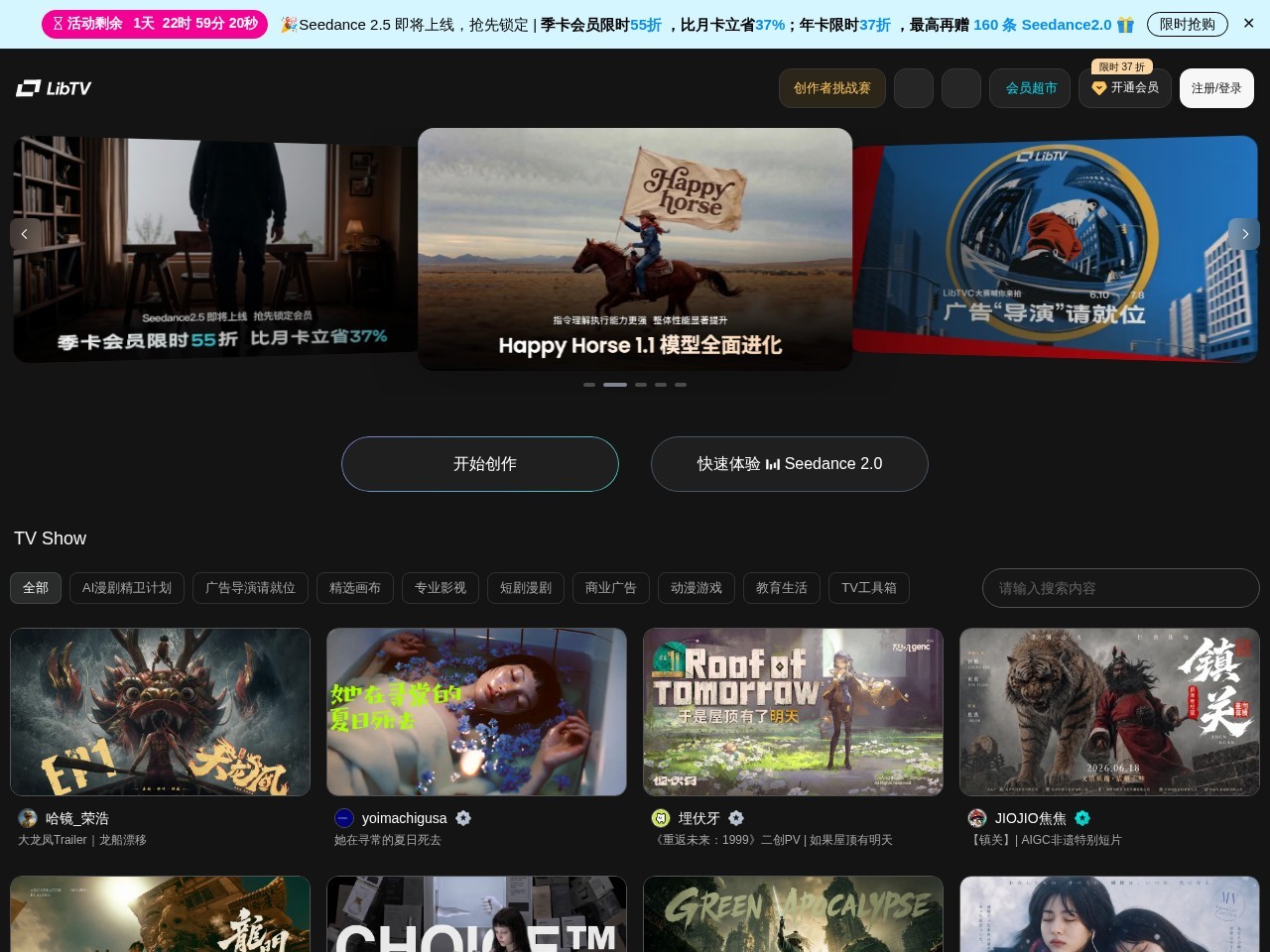
Website Screenshot
LibTV has verified its implementation effects in multiple mainstream creation scenarios, and many industry users have achieved several times improvement in video production efficiency using it:
Scenario 1: AIGC Short Drama Production
Short drama studios manage character images through a team asset library. Dozens of storyboard artists advance projects simultaneously. Character consistency across the entire film can reach over 95%. The production cycle for a single episode of a short drama is compressed from 7 days to 4 hours.
Scenario 2: Brand Advertising Production
4A advertising teams align script, art, and client requirements on the same canvas. They quickly generate over 10 versions of advertising samples in different styles. Iteration efficiency increases by 80%, greatly shortening the proposal confirmation cycle.
Scenario 3: Self-media Short Video Batch Production
Self-media operators batch import sales scripts. Through the storyboard group function, they generate dozens of short video materials with one click. Subtitles adapted for different platforms are generated automatically. Daily video output increases from 3 to over 30.
Scenario 4: Art Short Film Creation
Independent creators use the built-in TV Show inspiration library to reference lens styles and quickly generate experimental art short films. The core production process of "Peony Record," the AIGC film awarded at the 2026 Beijing Film Festival, was completed on the LibTV platform.
Seedance 2.0 Generation Engine
Equipped with the latest self-developed video generation engine, it supports generating clips of any duration from 1-15s. In Fast mode, generation speed increases by 300%. It supports custom lens parameters, aperture focal length, and lighting modes, accurately restoring professional lens language.
Team Real-time Collaboration Canvas
Infinite canvas multi-person synchronous editing similar to online documents. Team members can simultaneously adjust prompts, generate materials, and modify storyboards. All operations are automatically synchronized in real-time, eliminating the need to repeatedly transfer files to synchronize versions.
Character Subject Asset Library
Upload 2-3 character reference images to create a dedicated subject library. All team members can directly call it. Character image consistency across storyboard generations is guaranteed to the extreme, solving the common AI video pain point of character "face changing".
Storyboard Group Batch Generation
Multiple storyboard images can be grouped to batch generate corresponding dynamic video clips with one click. After generation, individual clips can be adjusted separately, HD restored, and image style fine-tuned, greatly improving production efficiency for multi-shot projects.
Project-based Version Management
Automatically retains all generation versions of every shot and every video segment. Supports quick version comparison and one-click rollback reuse. It does not require local storage of large amounts of redundant materials. All project materials are uniformly archived and managed.
Full Process Closed-loop Editing
Built-in video synthesis nodes. No need to jump to external editing tools. Complete clip splicing, subtitle addition, image cropping, and audio track synchronization directly in the canvas. One-click export of watermark-free HD finished films, achieving a closed loop for the entire creation process.
1
Create Project Initialization
After logging into the Web version, create a corresponding type of video project, fill in basic project information, set target resolution and video ratio, and choose whether to invite team members to join the dedicated collaboration space.
2
Script and Storyboard Production
Import or directly write Chinese creation scripts. Batch generate corresponding storyboard images based on script prompts. Supports uploading reference images, adjusting lens parameters, and manually modifying storyboard image details.
Batch Generate Video
Group the confirmed storyboard images, select the generation mode of Seedance 2.0, and batch generate all dynamic video clips with one click. Regenerate clips with unsatisfactory effects by adjusting prompts individually.
4
Synthesize and Export Finished Film
Select all generated video clips, add video synthesis nodes to complete editing and splicing, add subtitles and background music. After confirming the effect, export the watermark-free finished film at the corresponding resolution.
Small and Medium Video Studios
Need to efficiently batch produce multi-shot video content, control labor costs, and have a strong demand for improving cross-position collaboration efficiency among team members.
Self-media Operation Teams
Need to quickly produce a large amount of short video materials for different accounts and styles, meeting the demand for multiple content productions per day.
Advertising Creative Practitioners
Need to quickly output multiple versions of advertising samples in different styles, providing clients with more option choices and shortening the creative iteration cycle.
Independent Film Creators
Individuals can complete video creation projects that originally required a small team, greatly lowering the production threshold for art short films and independent feature films.
Enterprise Content Operations Personnel
No need for a professional editing team. Complete the full process production of enterprise promotional films and product introduction videos in one stop, reducing content production costs.
Short Drama Production Teams
Batch generate vertical short drama materials, uniformly manage character and scene styles across the entire series, and greatly shorten the pre-production cycle of short dramas.
Short Video Bloggers
Can quickly generate creative short video materials with a consistent style for their own accounts through LibTV. Weekly content output increases by 3-5 times, leaving more time for account operation and interaction.
Video Directors
Quickly generate dynamic storyboards for team and client confirmation. No need to spend a lot of time making static storyboard PPTs. Pre-production proposal communication efficiency increases by more than double.
MCN Operators
Build a material asset library shared across all accounts in the team space. Commonly used characters, scenes, and style templates for all bloggers under their management are uniformly managed, reducing repetitive work in content production.
Short Drama Creators
Fix character images across the entire series using the character library, batch generate corresponding plot segments. A single person can complete the production of a vertical short drama episode of over 1 minute. Production efficiency far exceeds traditional shooting modes.
Brand Marketing Managers
Quickly generate advertising samples in different creative directions, quickly test effects in a small range, and filter out the video version with the highest conversion rate at the lowest cost before scaling up placement.
Content Planners
Quickly transform creative ideas into previewable dynamic video samples. Synchronizing creativity with the team is more intuitive, avoiding rework caused by understanding deviations in the post-production stage.
Extreme Chinese Scenario Optimization
Specialized training for the expression habits of domestic creators and local visual styles. Generated images fit the needs of the Chinese context, completely without the "acclimatization" problems of overseas AI video tools.
Outstanding Team Collaboration Capability
It is currently one of the few AI video platforms that truly supports multi-person real-time synchronous creation. The infinite canvas mode supports members of different positions advancing work simultaneously. Team collaboration efficiency is far higher than other single-user tools.
Character Consistency Control
The unique character subject library function perfectly solves the pain point of character image jumps across lens generations. It is a product in the first tier of character unity performance among AI video tools.
Ultra-long Process Full Closed-loop
From script to storyboard to video generation to final export editing, the entire process is completed within the platform. No need to transfer materials back and forth across multiple tools, avoiding a large amount of invalid format conversion and file transfer work.
LibTV adopts a layered flexible pricing model: 1. Basic Free Version: Provides limited video generation quota, supports 720P resolution and clips under 15 seconds, meeting novice experience and lightweight creation needs; 2. Membership Subscription: Divided into Personal and Team versions, paid monthly/yearly, unlocking 1080P/4K resolution, longer generation duration, watermark-free export, and commercial authorization rights. The Team version supports multi-account permission control and project sharing; 3. Pay-as-you-go: Non-subscription users can be charged separately based on generation duration, resolution, and model type used, adapting to occasional large-quota creation needs; 4. Enterprise Exclusive Customization: Provides exclusive commercial authorization packages for brands and large studios, covering full material commercial compliance rights, with customizable private deployment solutions.
Q: Is LibTV suitable for beginners with no video production experience?
A: Very suitable. The platform provides step-by-step creation guidance, a large number of built-in script templates, and a TV Show high-quality case library. Beginners can follow the templates step by step to complete the entire process from text to finished film. They do not need to master complex post-production software operations to produce qualified video works.
Q: Can videos generated with LibTV be used commercially directly?
A: Content generated by Personal Subscription and Team version users defaults to obtaining platform commercial authorization. Enterprise version users can obtain complete full-link commercial compliance certification, avoiding risks related to material copyright.
Q: What is the maximum duration supported by videos generated by Seedance 2.0?
A: Currently, a single clip supports a maximum of 15 seconds generation. Multiple generated clips can be spliced into a complete video of any duration through the platform's built-in synthesis function, meeting the production needs of long video content.
Q: How many people can collaborate online simultaneously in LibTV's team collaboration?
A: The Team version currently supports up to 50 members collaborating in the same project canvas simultaneously. All operations are synchronized in real-time, without operation conflicts or screen lag. It fully meets the team usage needs of small and medium-sized studios.
Q: How is the character image consistency performance of generated videos?
A: Through the platform's exclusive character subject library function, after uploading 2-3 character reference images to create a dedicated subject, all team members can directly call this subject to generate shots. Character image consistency across storyboards can reach over 95%, far higher than similar ordinary generation tools.
Q: Can LibTV's capabilities be integrated into other AI assistants for use?
A: Yes. The official has opened the libtv-skills plugin capability, supporting integration with AI assistants such as OpenClaw, Feishu Assistant, and KimiClaw. AI fully automatic video creation can be achieved through simple configuration.
We recently conducted a 3-day in-depth test of the latest version of LibTV. The overall user experience far exceeds other AI video tools we have tried before. The most surprising feature was team collaboration. We invited 3 storyboard artists, 1 copywriter, and 1 project manager to enter the same short drama project space simultaneously. Everyone operated on the same infinite canvas. Adjusted storyboard prompts were immediately visible to others. There was no need to repeatedly transfer files to synchronize versions in WeChat like before. We uploaded 2 reference images of the female lead to create a dedicated subject library. In the generated 20+ shots, the female lead's image almost did not appear distorted or face-changed. This performance was better than several leading AI video tools we used before. In Seedance 2.0's Fast mode, batch generating videos from 10 storyboards took less than 2 minutes. The efficiency was astonishing. Finally, we directly spliced all clips and added subtitles within the canvas. We did not open any other editing software throughout the process. We completed a 1-minute short drama sample that was previously estimated to take 3 days in just 2 hours. The overall usage smoothness was very high.
References:.
This page provides an editorial summary based on publicly available information. It is not a republished article. Use the source link below for the original report.